Guides
Voice Periodontal Charting: 7 Criteria for Choosing Software
Standard probe, languages, corrections, follow-up, and cost: a practical guide for dentists and hygienists, with examples from PerioVox.
When choosing voice periodontal charting software, it is worth checking what data it records, how it allows corrections, what its requirements are, and what you can do with the information afterward. Languages, dental notation, and cost of use also matter.
At PerioVox, we have organized this decision into seven practical criteria. Our platform's starting point is clear: free today, free forever, using your standard probe and AI-assisted voice charting.
This guide is intended for dentists and hygienists who want to evaluate a tool before incorporating it into their clinical workflow.
1. What it records and how it positions each data point
A voice periodontal charting system must allow each measurement to be mapped to the tooth and site examined. When evaluating a tool, check what information it supports and how it displays it on screen.
In PerioVox, you can record probing depths, gingival margin, bleeding, suppuration, plaque, mobility, furcations, and clinical notes. The clinician performs the examination and dictates the measurements; the platform uses AI to interpret the dictation and organize the chart.
During an initial test, check how the tooth is identified and how the values are presented. A phrase such as “Eighteen: four, three, three” serves as an illustrative example of dictation using FDI notation. On-screen review is part of the workflow.
The voice periodontal charting guide explains this process in more detail.
2. What you need to use it in your operatory
Before choosing, check the software requirements: device, browser, microphone, and any specific instruments required. Test the setup you would actually use during an examination.
PerioVox runs in the browser of a compatible device and allows you to work with a conventional periodontal probe. The browser requires permission to access the microphone.
An initial test can help you verify:
- Whether the microphone picks up your voice from your working position.
- Whether you can read the chart on the operatory screen.
- Whether dictation is understood in the environment where you will use it.
- Whether the device and connection allow you to complete the workflow.
Choose your setup based on that test. Operatory conditions can differ from those of a demonstration.
3. Which languages are supported for dictation and the interface
Check dictation languages and interface languages separately.
PerioVox understands dictation in 97 languages. The application interface is available in Spanish, English, and French. This distinction clarifies which language you can enter data in and which one you will read menus, buttons, and labels in.
If your team uses multiple languages, test the phrases and notation you typically use. Feature documentation should make its scope clear without assuming that all menus are translated into every dictation language.
4. How an entry is corrected
Evaluate data correction as part of the software demonstration. It is helpful to check what happens when you need to return to a previous tooth or modify an already recorded measurement.
In PerioVox, you can dictate corrections by voice. When testing this feature, verify the tooth, site, and value that have been modified before continuing.
A simple sequence to evaluate a tool is to enter test values, request a change, and check the result. Use a mock case to familiarize yourself with the process.
Speech recognition can produce discrepancies. The ability to locate and correct an entry helps maintain control over the chart.
5. What dental notation systems it supports
Tooth numbering must align with what your team uses. Check which systems the software supports and how they are selected.
PerioVox allows you to work with ADA and FDI notation. Before starting a chart, confirm the chosen option and verify that the teeth are identified as expected.
Include this check in your initial test, especially if multiple people use the application or if the team routinely works with different systems. The selected notation must be clear to both the person dictating and the person reviewing the periodontal chart.
6. What you can do with the chart afterward
Downstream use of the data is also part of the decision. Review how previous visits are consulted, what comparisons are available, and what export or communication options the tool offers.
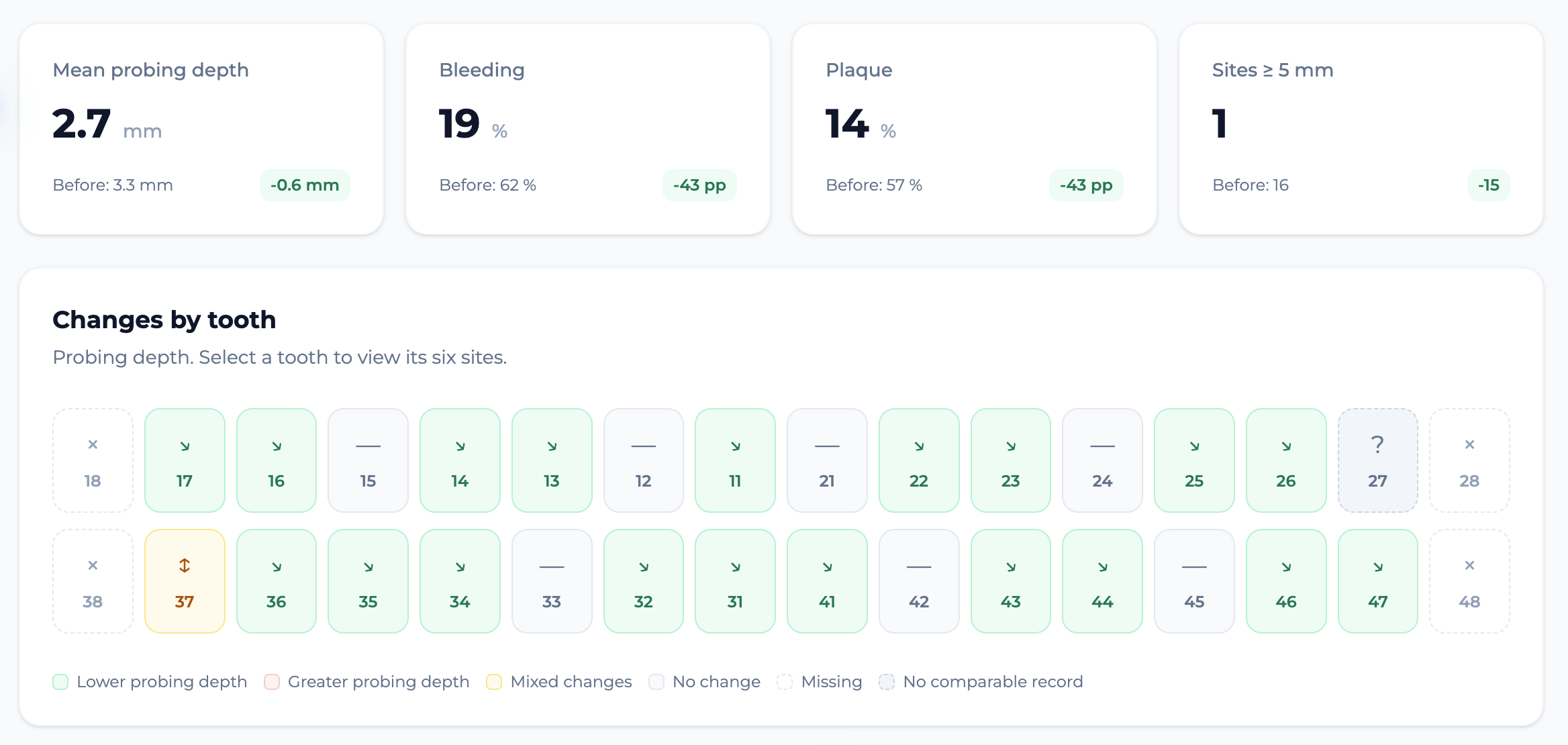
PerioVox includes visit-to-visit comparisons, Lang and IDRA diagrams, patient reports with QR code access, and CSV export.
The screenshot accompanying this article shows an example of the comparison interface: indicators and probing changes organized by tooth. It serves to illustrate the feature; values in a screenshot do not demonstrate a clinical effect of the software.
You can explore the guide to comparing periodontal charts and assess what information you need to retain or share in your workflow.
7. How much it costs and what conditions you should check
Check what access includes and whether usage depends on a temporary trial, a subscription, or purchasing specific equipment.
Using PerioVox is free and will remain free. You can chart by voice with your standard probe, without purchasing a dedicated electronic probe to use the platform.
If you need to connect charting with your practice management software, check the requirements and status of that specific integration. The dental software integration guide explains PerioVox's approach to these collaborations.
Also evaluate the terms of service and the availability of features that are essential for your team.
A quick test before deciding
You can use this checklist to organize an initial evaluation:
- Select the notation system and working language.
- Enter measurements on a mock case.
- Check where they have been recorded.
- Modify an entry and verify the change.
- Explore comparisons and reporting or export options.
- Confirm the requirements and cost of use.
This evaluation helps you ask specific questions about the tool and see how it fits into your operatory. Data on time, accuracy, or clinical outcomes require specific assessments.
Frequently Asked Questions
Is an electronic periodontal probe required?
PerioVox allows you to use your standard periodontal probe. You need a compatible device with a browser and microphone.
Does AI perform the periodontal probing?
The clinician performs the probing and dictates the measurements. PerioVox uses AI to interpret the dictation and organize the chart, which the clinician reviews.
Is PerioVox only free during a trial?
PerioVox is free today and will remain free. That commitment is part of the platform's core proposition.
Try PerioVox
Get started free with PerioVox and explore the workflow with a test case before incorporating it into your practice.
Additional documentation
Updated: